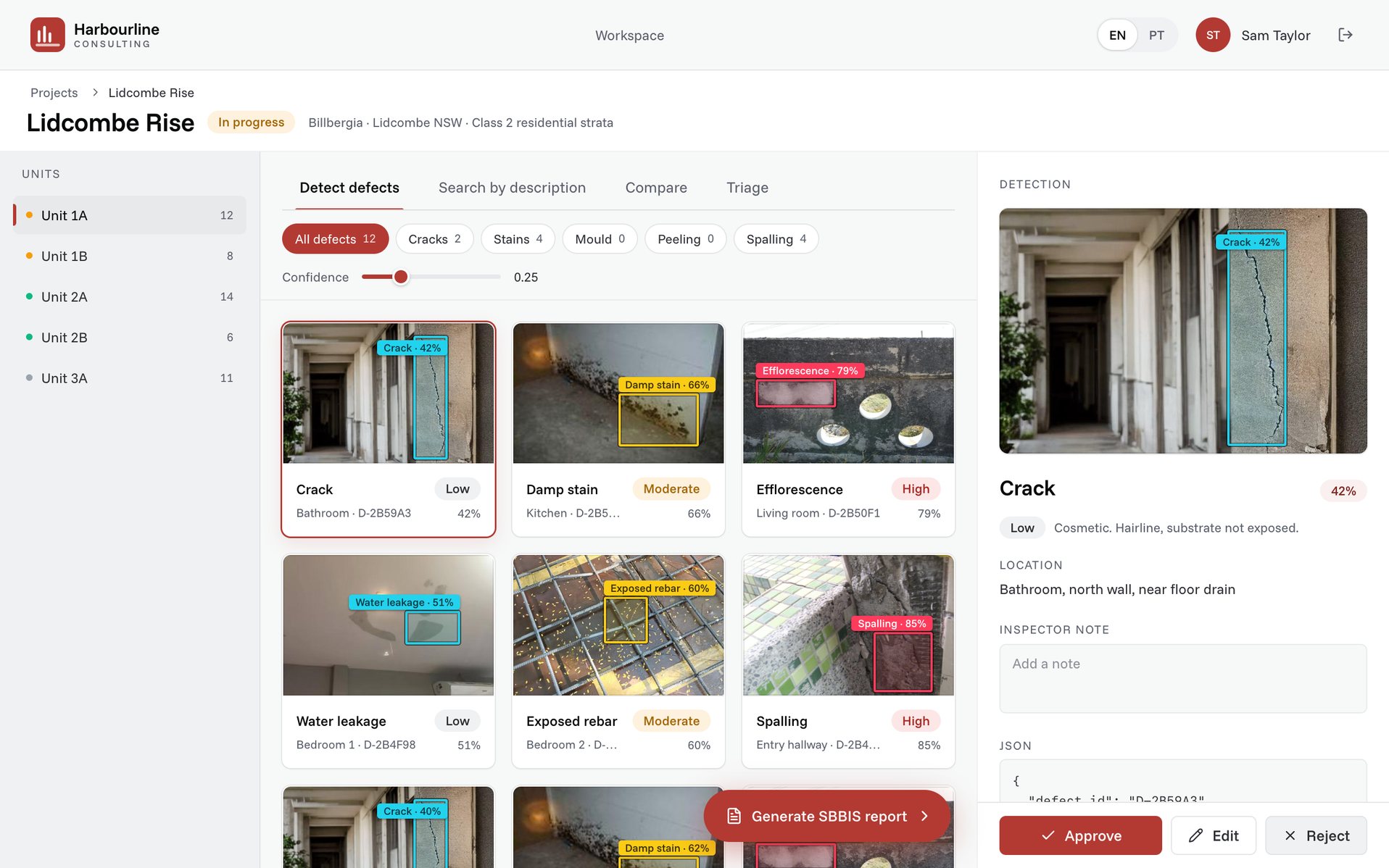
An Australian building inspection consultancy was losing most of each inspector's day to paperwork after the site visit. I researched their workflow, designed the inspector's workspace and built its frontend with a full-stack developer, taking it from a two-day pitch prototype to an MVP in a live pilot four weeks later.
- Role
- Product lead, design engineer
- Year
- 2026. 2 days to pitch, 4 weeks to MVP
- Stack
- Next.js, Tailwind, Claude Code
Problem
The consultancy inspects residential apartment buildings. Its work covers interim and final reports, quality checks during construction, defect liability inspections and re-inspections at warranty milestones, and every one of those reports is built from photos.
An inspector takes hundreds of photos per unit. The site visit itself is fast, and the time goes afterwards. Every photo and note gets retyped into a defect register, then into a formal report, and at re-inspection someone matches new photos against old ones by hand.
Tired inspectors miss defects, two inspectors grade the same crack differently, and new hires take months to learn the report language. The founder had also said publicly that a single photo rarely captures full context. The buyer was interested in AI and skeptical of it at the same time.
Approach
We had no access to their photos or tools before the first meeting, so I worked from public sources: their website, project list, job ads, published opinions and the reporting standard they follow. From that I mapped the inspector's day in six steps and presented it as a hypothesis for them to correct.
Then I built a clickable prototype of the inspector's workspace in a day. It had one job, which was to show their inspector's day with the tool in about 90 seconds. A scoped proposal followed three days after the meeting.
The MVP, week by week.
Week 1. Their domain. Workshops with inspectors, sample photos, past reports and a review of the tools they already used. We mapped defect types to their own categories and severity language.
Week 2. Their photos. Detection running on their own inspection photos, with accuracy measured per defect type, so everyone knew the strengths and weak spots before the pilot.
Week 3. The workspace. Projects, unit review, and accept, edit or reject. Draft report sections written in their voice from approved findings, re-inspection compare and the defect register export. It installs on phones and laptops as a PWA.
Week 4. Pilot. One live project end to end, with three to five inspectors reviewing real findings and sending reports from the tool.
Decisions
Augment the inspector. Never replace
General-purpose AI tools describe the wrong defect with full confidence, which is unusable in a report someone signs and indefensible in a dispute. So every finding arrives as a suggestion, highlighted on the photo with a confidence level, and the inspector accepts, edits or rejects it. The inspector signs the report, so the inspector stays in charge.
Follow the job, not the technology
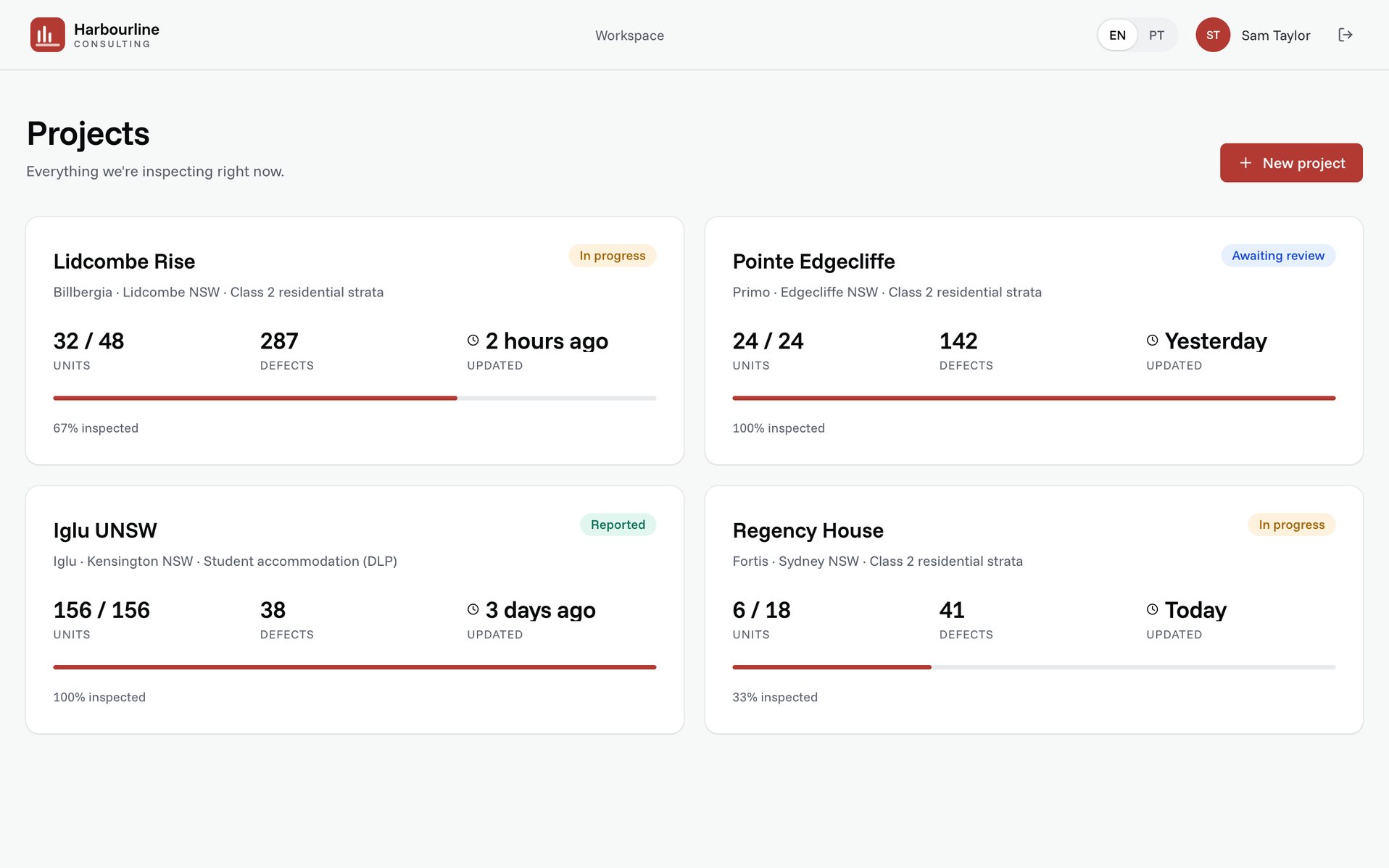
A model demo proves that a model works, but it does not show anyone their working day. So the product follows the job: projects, then defect review unit by unit, then the report. It uses their report formats, their project types and their severity language, and the export is their defect register, ready to send.
Then and now on one screen
Re-inspection was the slowest and most error-prone step. The inspector had to find last year's photo of the same wall, compare by eye and write it up. The workspace puts the original and the re-inspection side by side and sorts every defect into rectified, unchanged or new. The inspector confirms, and the report section is generated from the result.
Show the edges honestly
Every buyer asks what happens with a defect the model was never trained on. Search by description answers that: the inspector types what they see, such as "peeling paint on ceiling", and the tool finds matching areas. Confidence is visible for every finding, weak results included, because a skeptical team trusts a tool that shows its limits more than one that hides them.
Design engineering
I designed the product and built the frontend with a full-stack developer. The prototype that won the pitch grew into the MVP, so nothing was thrown away along the way.
The process ran in three steps:
Spec first. I wrote a screen spec with every click mapped and every state named.
Spec to prototype. Claude Code built the three screens from that spec in a day, and I reviewed and adjusted every screen.
Data. Agents generated realistic seed data, defect records and export files, so every click in the demo led to real content.
A few rules held from pitch to pilot. Every click leads somewhere, and there are no empty states. The inspector can always see why something was flagged, and nothing goes into a report without a human approving it.
Outcome
It took two days from research to the pitch prototype, three days from the meeting to a scoped proposal, and four weeks from the signed proposal to an MVP in use. The pilot ran on one live project with three to five inspectors. They now edit a draft instead of writing each report from scratch, and re-inspection has become a confirmation step rather than a search through old photos.