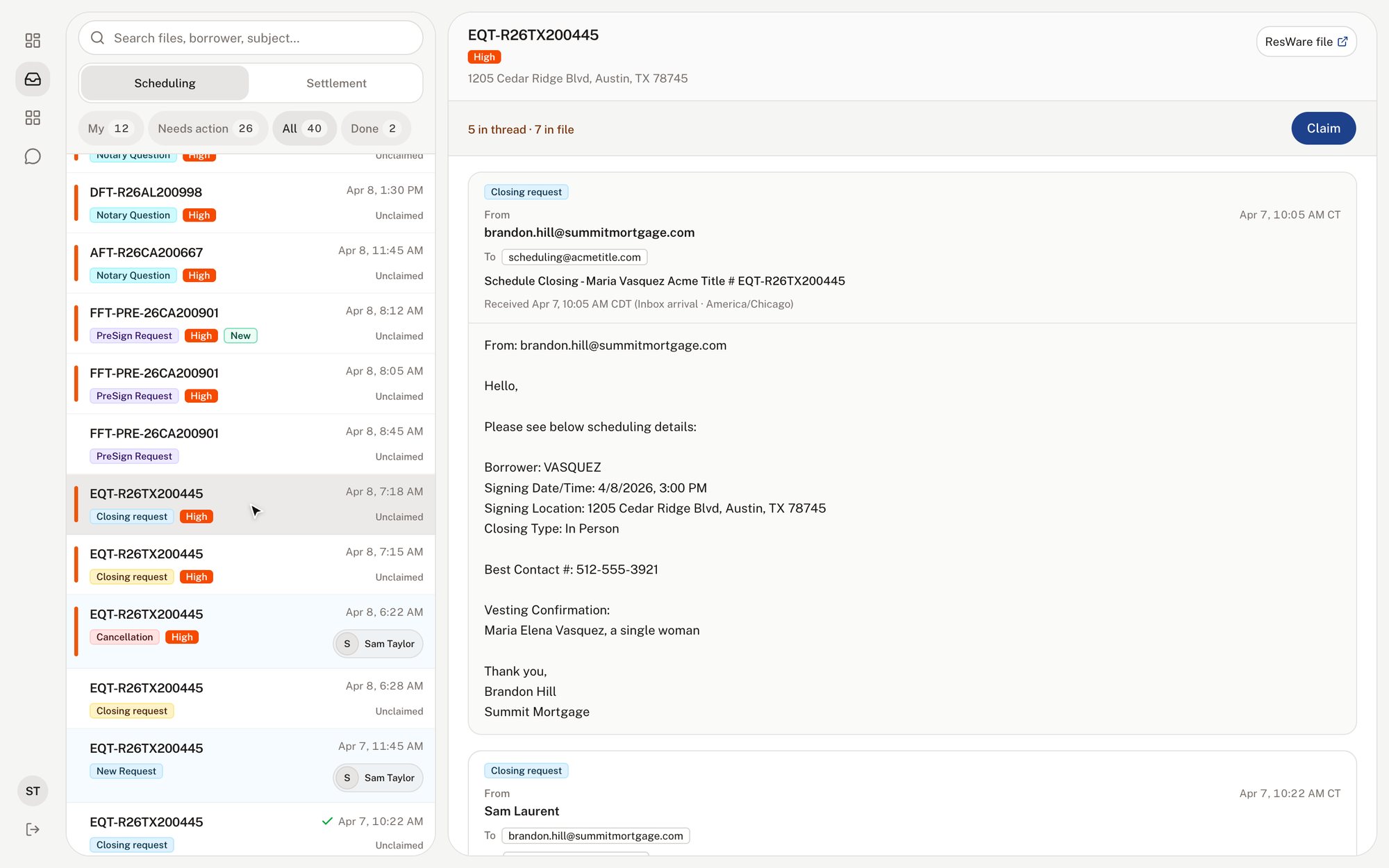
A US title company coordinated its closings through two shared inboxes and a Google Sheet. I ran discovery, set the product direction, designed the queue and built its production frontend, shipping the MVP with one AI engineer in four weeks.
- Role
- Product manager, design engineer
- Year
- 2026, 4 weeks
- Stack
- Next.js, TypeScript, shadcn/ui, Cursor, Claude Code
Problem
The scheduling team coordinates real estate closings. Orders, notary assignments, reschedules and cancellations all arrive by email, into two shared inboxes that together take in about 1,800 emails a weekday and more than 3,000 on a peak day.
The team worked from two shared inboxes, and nobody owned any of the emails in them. Schedulers opened the same messages in parallel, so work got done twice or not at all. Every order was entered twice, once in the system of record and once in a Google Sheet, and updates on the same file often arrived minutes apart and buried each other.
Distribution groups multiplied the load: a thousand emails to a list of ten means ten thousand emails read.
Approach
I spent two days on calls with schedulers, the closing team and operations, and mapped the scheduling flow from new order to signed closing, with every step, tool and handoff.
Then I checked what people told me against the data. A 40,000-email sample from 25 million rows of inbox history showed things nobody had said out loud: about 45% of one inbox was automated platform traffic, and one in five replies took more than a day.
I catalogued 24 pain points with evidence. Most traced back to one cause: the inbox was the team's task list, with no owner, no order and no state.
The answer was a queue, not an auto-responder. It shows the team what needs doing and who owns it, and AI works inside it rather than running it.
I kept three things out of scope on purpose: replacing the system of record, automation without a human, and file-level ownership, which the team said it was not ready for.
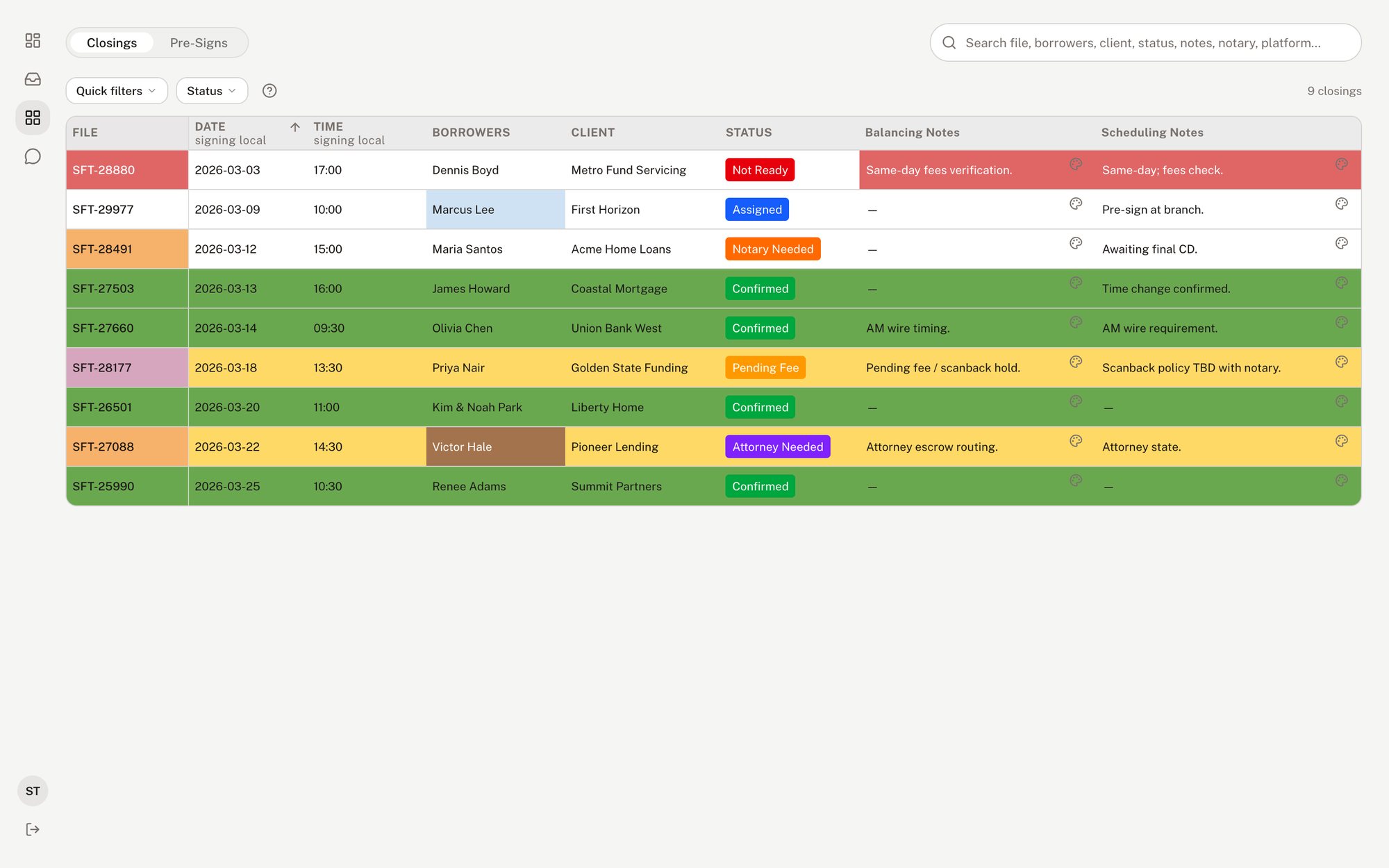
I built a clickable prototype in four days, using seed data shaped like the real inbox export. It had three views: the inbox, a grid in the shape of the team's Sheet, and a dashboard for leadership. The ops lead reviewed it live, and from then on it served as the spec.
The MVP, week by week.
Week 1. Foundation. Both inboxes connected, with every email classified as a new order, update, cancellation, reschedule or noise. Login, attachments and the base queue.
Week 2. File-centric queue. Emails grouped by file and matched to the system of record. Claiming, and reply not needed.
Week 3. Priority and noise. Urgency tags for attorney closings, same-day files and split signings, with platform notifications collapsed out of the way.
Week 4. Replies and rollout. AI-drafted replies with human edit and send, the leadership dashboard, and the team on the queue for daily triage.
The MVP runs on the client's own infrastructure, which their IT set as a hard requirement.
Settlement inbox, 20,000 email sample
- Platform sync
- 44%
- External senders
- 44%
- Staff replies
- 12%
Almost half of it is a platform talking to itself.
Decisions
The file is the unit, not the email
Schedulers think in files, while Outlook thinks in messages. The queue groups every email under its file, in order, with the latest activity on top. One file in the sample had 68 emails in four days. In the queue it is a single row.
Claim the conversation. Close every email
Claiming works on the email chain, and every row shows who has it. In review the ops lead asked for one more action, reply not needed. Every email now ends in one of three states, replied, claimed or dismissed, so nothing sits in limbo.
AI drafts. People send
Title work carries social security numbers, wire details and closing dates, so a wrong automated reply has a real cost. The AI classifies each email, flags urgency and drafts a reply, and the scheduler edits and sends it. Nothing leaves without a human, and security and PII handling were in scope from the first week.
Keep the shape of the Sheet
The Google Sheet was how the team saw its day, and taking it away on day one would have killed adoption. I designed a grid view in the Sheet's shape, fed by the queue, so the team could start somewhere familiar. It stayed in the prototype, and the MVP shipped the queue on its own.
Design engineering
I designed the interface and built the production frontend, working in the browser rather than through handoff files. It took two weeks to go from prototype to production, and the MVP shipped more than ten views on a system of 30 to 40 components, so what the client approved is what went live.
Agents were part of the work at every stage:
Data. Agents parsed and analyzed the 40,000-email sample for volumes, automated traffic, reply times and threading by file number.
Discovery. They synthesized call notes and transcripts into a first cut of the pain points, which I then checked against the evidence.
Prototype. I built it in Cursor and Claude Code from written specs, in four days.
Production. Agents wrote frontend code against the component system, while I wrote the specs, reviewed every change and owned the result.
Review rounds were specific. The urgency bars went from 2px to 4px because nobody noticed them at a glance. The system of record panel collapsed by default because most of the time it was noise. A "2 messages" label became "1 needs action", because a count is not a decision.
Outcome
I would love to see them get rid of Google Sheets.
- Discovery to prototype
- 4 days
- Prototype to production
- 2 weeks
- Discovery to MVP in daily use
- 4 weeks
- Time to triage
- About 15 minutes down to under 2
- Duplicate pickups
- Claiming ended double work on the same email
- Shipped
- 10+ views, 30 to 40 components